- audit_log: Like the access log, but more complete
- Has full Request Headers and POST data
- Generated by mod_security
- An Apache module for enforcing fine-grained and extensive security measures
- ssl-access_log: the access log for SSL requests
- ssl-error_log: the error log for SSL requests
- ssl_request_log: same as ssl-access_log but without the status code
- ssl_egine_log: information from Apache’s mod_ssl that combines entries from access and error
- upload/: contains html files with Chinese characters in them
- Each file is labeled with a timestamp and IP (we’ll come back to this)
Other Apache Logs
Log Analysis – Apache Logs
- 131.108.45.81 - - [05/Dec/2014:23:57:14 -0500] "GET /scripts/auktion.cgi?menue=../../../../../../../../../etc/passwd HTTP/1.1" 302 268 "-" "Mozilla/4.0 (CriticalWatch-FusionVM)"
- What does this tell you?
- How can this be helpful to an investigation?
- IP Address – 192.168.10.1
- Date and Time offset - [03/Sep/2012:14:40:53 -0400]
- Method Invoked – GET
- URL Requested - /cgi-bin/edit.pl
- Protocol Used - HTTP/1.1
- Result Code – 404
- Numbers of Bytes Transferred - 305
Directory Traversal Attack
192.168.10.1 - - [03/Sep/2012:11:11:05 -0400] "GET /../../../tmp HTTP/1.0" 400 352
192.168.10.1 - - [03/Sep/2012:11:11:19 -0400] "GET /../../../
HTTP/1.0" 400 349
192.168.10.1 - - [03/Sep/2012:11:11:22 -0400] "GET /../../../usr HTTP/1.0" 400 352
192.168.10.1 - - [03/Sep/2012:11:11:26 -0400] "GET /../../../usr HTTP/1.0" 400 352
192.168.10.1 - - [03/Sep/2012:11:12:04 -0400] "GET /../../home HTTP/1.0" 400 350
192.168.10.1 - - [03/Sep/2012:11:12:10 -0400] "GET /../../cgi-bin HTTP/1.0" 400 353
Note (in blue): Attempts to access directories outside standard web environment
192.168.10.1 - - [03/Sep/2012:14:38:19 -0400] "GET /cgi-bin/publisher/search.cgi?dir=jobs&template=;cat+/etc/passwd|&output_number=10 HTTP/1.0" 200 306
192.168.10.1 - - [03/Sep/2012:14:40:20 -0400] "GET /login.asp?user=masmith&password=123 or 1=1 " 200 308
192.168.10.1 - - [03/Sep/2012:14:40:20 -0400] "GET products.asp?productid=123;DROP TABLE Products " 200 254
Log Analysis – Apache Logs : Access Log
•131.108.45.81
- - [05/Dec/2014:23:57:13 -0500] "GET //auktion.cgi?menue=../../../../../../../../../etc/passwd
HTTP/1.1" 302 260 "-" "Mozilla/4.0 (CriticalWatch-FusionVM)"
•131.108.45.81
- - [05/Dec/2014:23:57:14 -0500] "HEAD / HTTP/1.1" 302 -
"-" "Mozilla/5.00 (FusionVM/2.1.5)"
•131.108.45.81
- - [05/Dec/2014:23:57:14 -0500] "GET /auktion.cgi?menue=../../../../../../../../../etc/passwd
HTTP/1.1" 302 260 "-" "Mozilla/4.0 (CriticalWatch-FusionVM)"
•131.108.45.81
- - [05/Dec/2014:23:57:14 -0500] "GET /FusionVM/ HTTP/1.1" 302 214 "-"
"Mozilla/4.0 (CriticalWatch-FusionVM)"
•131.108.45.81
- - [05/Dec/2014:23:57:14 -0500] "\x16\x03\x01" 302 194 "-"
"-"
•131.108.45.81
- - [05/Dec/2014:23:57:14 -0500] "\x16\x03\x03\x02\xae\x01"
302 194 "-" "-"
•131.108.45.81
- - [05/Dec/2014:23:57:14 -0500] "GET /cgi-bin/auktion.cgi?menue=../../../../../../../../../etc/passwd
HTTP/1.1" 302 268 "-" "Mozilla/4.0 (CriticalWatch-FusionVM)"
•131.108.45.81
- - [05/Dec/2014:23:57:14 -0500] "GET /scripts/auktion.cgi?menue=../../../../../../../../../etc/passwd
HTTP/1.1" 302 268 "-" "Mozilla/4.0 (CriticalWatch-FusionVM)"
•131.108.45.81
- - [05/Dec/2014:23:57:14 -0500] "\x16\x03\x02" 302 194 "-"
"-"
•131.108.45.81
- - [05/Dec/2014:23:57:28 -0500] "GET /../../../../../../../../../boot.ini
HTTP/1.1" 400 226 "-" "Mozilla/5.00 (FusionVM/2.1.5)"
•131.108.45.81
- - [05/Dec/2014:23:57:28 -0500] "GET /../../../../winnt/repair/sam._
HTTP/1.1" 400 226 "-" "Mozilla/5.00 (FusionVM/2.1.5)"
•131.108.45.81
- - [05/Dec/2014:23:57:28 -0500] "GET
/..\\\\..\\\\..\\\\..\\\\..\\\\..\\\\..\\\\boot.ini HTTP/1.1" 302 213
"-" "Mozilla/5.00 (FusionVM/2.1.5)"
Apache and Its Logs
- Very popular open-source web server
- 15 years of active development
- On 120 million Internet servers (as of April 2010)
- 64.91% of all web servers as of January 2012
- By default has two main log files:
- Access log (logs all requests to the server)
- Error log (logs all requests that caused an error)
- Other types as well: ssl_access, ssl_error, etc.
Log Analysis - IIS Logs
Internet Information Service Logs (IIS)
 HTTP Result Codes
1xx – Informational
2xx – Successful
3xx – Redirection
4xx – Client Error
5xx – Server Error

1xx – Informational
2xx – Successful
3xx – Redirection
4xx – Client Error
5xx – Server Error


Log Analysis
Server/Machine logs


- FTP Logs
- IIS Logs
- Apache Logs
- Windows Event Logs
- Windows Firewall Logs
1-Log Analysis – FTP Logs
- #Software: Microsoft Internet Information Services 6.0
- #Version: 1.0
- #Date: 2014-03-17 22:11:28
- #Fields: time c-ip cs-method cs-uri-stem sc-status sc-win32-status
- 22:11:28 66.38.28.183 [5]USER anonymous 331 0
- 22:11:28 66.38.28.183 [5]PASS -iss@iss.iss.iss 230 0
- 22:11:28 66.38.28.183 [5]MKD iss.test 550 5
- 22:11:28 66.38.28.183 [5]RMD iss.test 550 5
- 22:11:28 66.38.28.183 [5]QUIT - 226 0
- 22:11:28 66.38.28.183 [6]USER anonymous 331 0
- 22:11:28 66.38.28.183 [6]PASS scanner@test.net 230 0
- 22:11:28 66.38.28.183 [7]USER anonymous 331 0
- 22:11:28 66.38.28.183 [7]PASS scanner@test.net 230 0
- 22:11:28 66.38.28.183 [7]CWD - 250 0
- 22:11:28 66.38.28.183 [8]USER 3,255 331 0
- 22:11:28 66.38.28.183 [8]PASS - 530 1326
- 22:11:28 66.38.28.183 [9]USER anonymous 331 0
- 22:11:28 66.38.28.183 [9]PASS scanner@test.net 230 0
- 22:23:22 66.38.28.183 [12]USER anonymous 331 0

22:11:28 66.38.28.183 [5]MKD iss.test 550 5
- time - 22:11:28
- c-ip - 66.38.28.183
- cs-method - [5]MKD
- cs-uri-stem - iss.test
- sc-status - 550
- sc-win32-status - 5
Result Codes – First Digit
1yz – Positive Preliminary Reply
2yz – Positive Completion Reply
3yz – Positive Intermediate Reply
4yz – Transient Negative Reply
5yz – Permanent Negative Reply


Understanding Common Log Attributes
- What kind of information do logs contain?
- Example entry:
Feb 1 00:00:02 bridge kernel: INBOUND TCP: IN=br0 PHYSIN=eth0OUT=br0 PHYSOUT=eth1 SRC=192.150.249.87 DST=11.11.11.84LEN=40 TOS=0x00 PREC=0x00 TTL=110 ID=12973PROTO=TCP SPT=220 DPT=6129
- WINDOW=16384 RES=0x00 SYN URGP=0
- Quite a lot of information, but very little at the same time
Cataloging the Information
- Feb 1 00:00:02: Date and time (GMT or Local)
- bridge kernel: NIC interface name
- INBOUND TCP: Type of traffic flow, direction and protocol
- IN=br0 PHYSIN=eth0 OUT=br0 PHYSOUT=eth1: Adapter traversal for the firewall
- SRC=192.150.249.87 DST=11.11.11.84: Source and destination IP
- LEN=40 TOS=0x00 PREC=0x00 TTL=110 ID=12973: IP Header information
- Sometimes includes DF as well
- PROTO=TCP SPT=220 DPT=6129: Protocol and port numbers
- Also have PROTO=UDP and PROTO=ICMP
- WINDOW=16384 RES=0x00 SYN URGP=0: Protocol specific information
Programs for Log Analysis
- Perl
- Awk / Sed
- SQL
- Oracle
- MS Access / Excel
- 3rd Party Programs – (Web Trends, Calamari, HP Open View, etc)
- Analysis Appliances – (Niksun, SNORT, etc)
- Built in Auditing Tools (Cisco, Active Directory)
- Forensic Tools – (Encase, FTK, etc)
Analyzing Logs
- General approach no matter what type of log is being looked at (not in a particular order):
- Understand the log information
- Parse the particular log format currently being scrutinized
- Keep in mind what device the log came from
- Understand the network topology
- Find anomalous/suspicious patterns based on above knowledge
What can logs do for?
- Tracks historic patterns of behaviors
- Identification of compromised targets
- Provides a trace of attack activity
- Provides a log of malicious activity even if server is “cleaned up”
- Provides evidence that is not captured at the Server or Application level
Types of Logs
- Server Logs
- Windows, Unix, Linux, Macintosh, etc.
- Application Logs
- Active Directory, Novel, IIS, Oracle, etc.
- Appliance Logs
- Firewall, Router, Switch, etc.
- Infrastructure Logs
- DNS, DHCP, LDAP, Proxy, Router, Switch, etc.
- External Logs
- Upstream ISP, Upstream DNS, etc.
Method of Obtaining Logs
- System Administrator
- Network Administrator
- Information Assurance Personnel
- Upstream Provider
Log Sizes and Durations
- Size – UP to 5+ GB of Text per day
- Sample (1 Day at USSS)
- DNS Logs – 4 x 800 MB per day
- Firewall Logs – 6 x 100 MB per day
- Internet Logs – 600 MB per day (URL only)
- Intranet Access Logs – 200 KB per day
- Switch Logs – 50 KB per day
- Duration –
- Sample
- Switch Logs – On device – Currently Hot
- Mail Logs – 5 years
- Squid Logs - 7 years
Types of Log Servers
- Pros and Cons to having a dedicated server
- Two general approaches:
- Push
- Pull
- Unix based (Syslog)
- Windows based (Event viewer)
What’s Logging?
- A way for a computer to record events that occur during execution
- An event is anything that causes a program to perform an action
- Ranges from error conditions to normal functioning of equipment
- Many crucial processes run in the background
- These background process logs are generated without direct input from the user
- Logging provides visibility into the operation of these processes
Covert_TCP
- http://www.psionic.com/papers/covert
- Uses TCP and IP headers to create covert channels
- Data can be hidden in various fields
- –IP Identification field
- One character embedded per packet
- –TCP sequence number
- One character embedded per SYN request and Reset packets
- –TCP acknowledgement number
- One hidden character per packet is relayed by a “bounce” server
- Can send data over any TCP source/destination ports
- –Can bypass firewall if use ports such as 25 or 53
 |
| Covert_TCP |

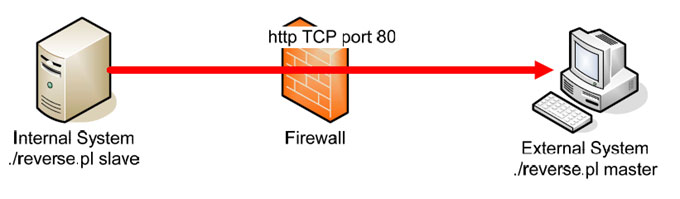
Reverse WWW Shell (HTTP)
- Allows an attacker to remotely access a victim machine with a command-line prompt
- A Reverse WWW Shell server and Perl interpreter must be installed on the victim machine
- A Reverse WWW Shell master software and Perl interpreter must be installed on the attacker’s machine
- Can sneak past firewall
- Perl code available at http://thc.pimmel.com
- Every minute, Reverse WWW Shell server will contact the master to retrieve commands issued by the attacker
- Reverse WWW Shell server executes the commands, sends the results to Reverse WWW Shell master (via http request), and retrieves the next command (via http reply)
- Victim machine appears to be a web client sending HTTP Get commands while attacker’s machine appears to be a web server
ICMP Tunnel / ICMPTX
- Establishes a covert connection between two remote computers (client and proxy) using ICMP echo requests and relay packets
- ICMP tunneling can be used to bypass firewalls rules through obfuscation of the actual traffic.
- Without proper deep packet inspection or log review, network administrators will not be able to detect this type of traffic through their network.
- Programs such as Loki, Hans, ICMP-Shell, PingTunnel
http://code.gerade.org/hans/
Covert Channels (Tunneling)
- Carrying one protocol inside another protocol
- Eg. Tunneling AppleTalk traffic over IP
- Any communications protocol can be used to transmit another protocol
- SSH protocol used to carry telnet, FTP, or X-Windows session
- Covert tunnel applications
- Hans, Loki
- Reverse WWW Shell
Subscribe to:
Posts (Atom)